Google has blocked your Merchant Center account: what to do and where to file a complaint
Google is continuously tightening its requirements for online stores that want to run Google Shopping ads. Due to these strict requirements, even minor website errors can lead to a Merchant Center account suspension. In this article, you'll learn about the reasons behind account suspensions and how to resolve them.
In 2012, Google launched its Shopping service. To encourage merchants to join, the company initially offered incentives and reviewed online stores without overly strict scrutiny. As Google Shopping became increasingly popular, the need to actively attract merchants disappeared. Google's requirements became stricter and have continued to tighten. As a result, new online stores are increasingly facing Google Merchant Center account suspensions. Nikolai Lukashuk, owner of the Marketing Link agency, explained how online stores can deal with these suspensions.
What is Merchant Center, and why can you do without it?
Google Merchant Center is a service that acts as an intermediary between Google Ads accounts and website product feeds. Merchant Center is used to run Standard Shopping and Performance Max campaigns, two types of advertising campaigns that display product ads. Even if your Merchant Center account is suspended, you can still run other types of advertising, including search ads, display ads, and Performance Max campaigns without a product feed.
A Google Merchant Center account suspension doesn't mean all is lost — you can try other types of advertising. Alternative campaign types may be less profitable than Shopping ads, but they are better than having no advertising at all. Advertising isn't inherently good or bad — it either generates a positive return on investment or it doesn't.
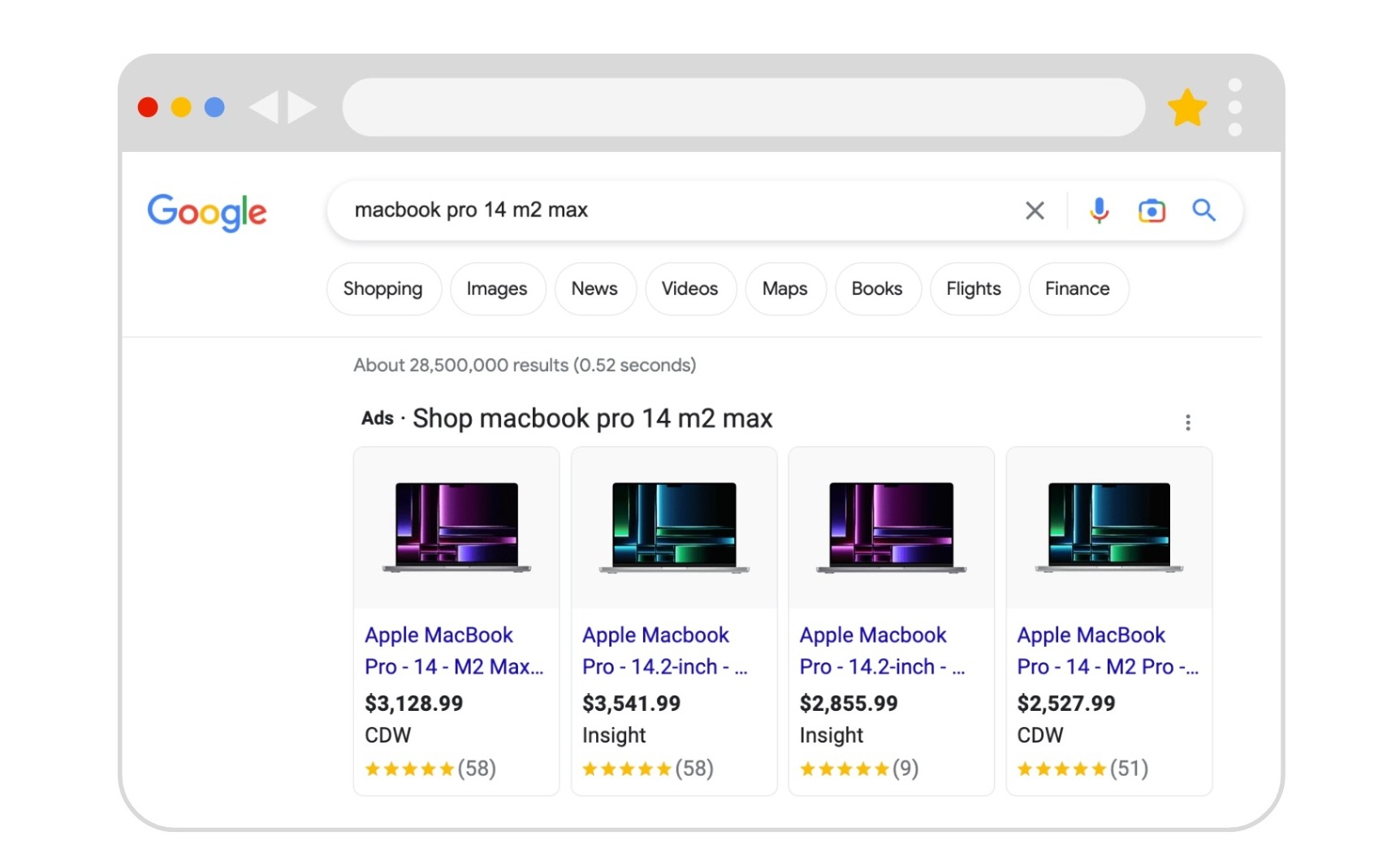
This is what a commercial advertisement looks like
The most common reasons for account suspension
You missed the period of simplified reviews
Since its launch, Google Shopping has grown into a massive shopping platform. Today, it is open only to the best merchants, and competition among online stores is extremely high. It's easier for Google to suspend an account first and then determine whether the decision was justified. This approach poses less risk to the company's reputation than approving your store during the review process and subsequently receiving a customer complaint.
Your store looks like other online stores and doesn't inspire customer trust
One of the criteria Google uses to evaluate merchants is customer satisfaction. Your store should have a solid track record and well-organized business processes. Expertise, authoritativeness, and trustworthiness are three factors Google uses to assess a website's credibility. New websites rarely meet these criteria because their owners often don't pay enough attention to details. For example, the "About Us" and "Payment and Delivery" pages may contain incomplete information.
You haven't invested in advertising campaigns
Google wants you to invest in advertising before offering you incentives. Stores that have previously run search advertising campaigns and invested sufficient funds in them typically pass the review process relatively easily. Problems may arise for merchants that haven't yet invested in advertising through Google and immediately attempt to launch Shopping campaigns.
How Google reviews your store
Google follows a clearly defined review process. The first stage is an automated review by bots, the second is a review by a human moderator, and the third is a review by a support specialist. All three stages must be completed in this specific order. For example, a store cannot fail the automated review and proceed directly to a review by a support specialist.
The first stage of the review
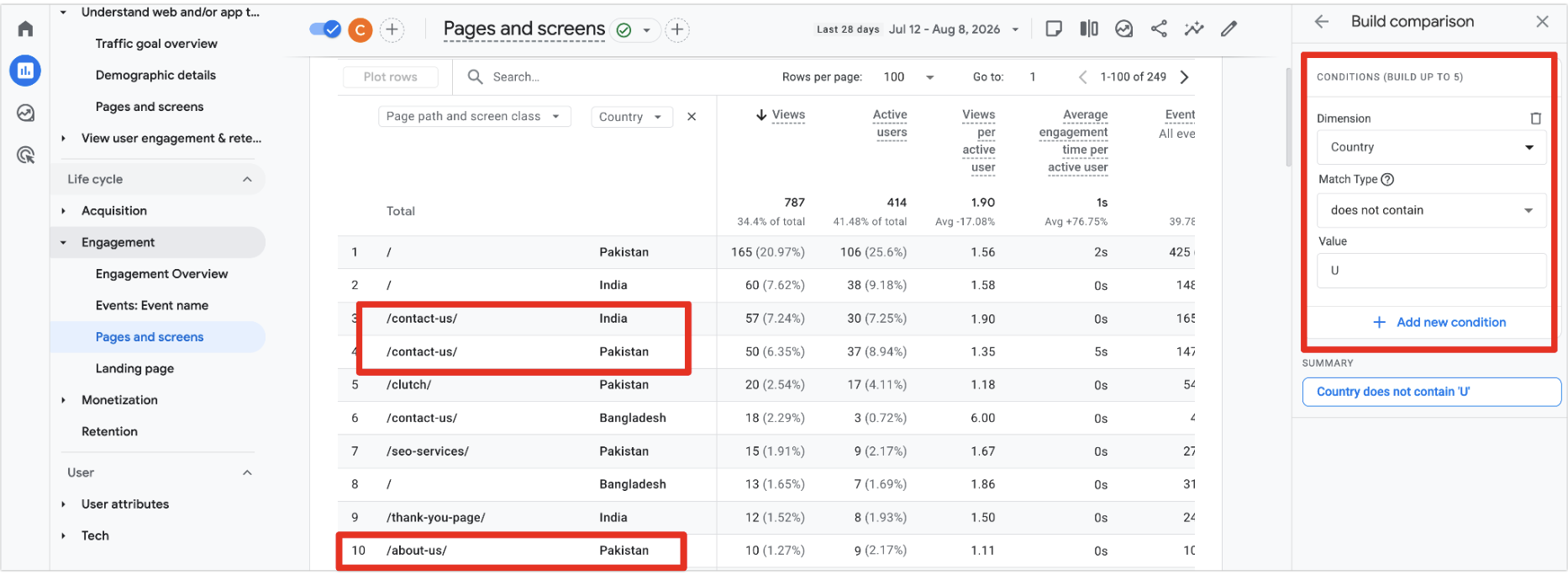
This is an automated review. You can identify bots in Google Analytics as users who visit your website from different countries and spend a few seconds on a page. The bots follow a checklist, assigning positive or negative points to your store:
a broken page linked in the navigation menu — a negative point;
errors in product descriptions — a negative point;
duplicate content — another negative point;
a missing image — another negative point.
The bot continues evaluating your store until it accumulates a critical number of negative points, resulting in an account suspension. If the checklist is completed and your store earns enough trust points, it moves on to the next stage. If your website is flawless, which is extremely rare, it skips the human review stage, and your Google Merchant Center account becomes operational immediately.
The second stage of the review — moderators
Google most often uses specialists from the Philippines, India, Pakistan, Vietnam, and Poland to review merchants. In Google Analytics, they appear as users who visit the website directly and spend about one minute on it. Their main task is to quickly find the phrase "door-to-door delivery." They may not realize that, for example, the shipping carriers listed on your website offer delivery to customers' addresses. Therefore, if you haven't provided all the information in the correct format, a moderator may suspend your account. Other reasons for suspension include:
slow page loading;
404 errors on product pages;
layout errors;
banners that fail to display.
Moderators do not answer questions or provide consultations. They only approve or suspend accounts. If your Merchant Center account is suspended by moderators, the next stage of the review involves Google Support.
The third stage of the review — Google Support
These specialists respond to inquiries but are not authorized to reinstate suspended Merchant Center accounts. They can refer your store for an additional review if everything on your website meets the requirements. In any case, the account suspension must be lifted by a moderator from the second stage.
How many review requests can you submit to Google Support?
Technically, there is no limit, but it's best to submit as few requests as possible because support specialists can see your inquiry history. If you repeatedly request reviews without promptly fixing the issues, Google Support may view this as a waste of their time. With each subsequent request, their responses will become increasingly generic.
Common reasons for Merchant Center suspension
Lack of online payment options
integrate a payment gateway that allows customers to pay for products online by card;
online payment should be available for all shipping methods. We don't recommend trying to save 1,5–3% on payment processing fees;
product prices must include taxes and all other charges, with no hidden fees;
the "Shipping and Payment" page must be accessible from both the website's header and footer;
payment and shipping information must be consistent across product pages, the "Shipping and Payment" page, and the checkout page.
Prohibited products
Google prohibits counterfeit products, including replicas featuring brand logos. You can find the full list of prohibited and restricted content here.
Inconsistencies in shipping and payment information
your website must clearly state that delivery to customers' addresses is available in the country where you sell your products;
the information in Google Merchant Center must match the information on your website;
shipping and payment information must be consistent across product pages and the checkout page;
specify delivery times, shipping costs, and order processing times;
if you offer international shipping, describe it in detail so moderators don't assume you're running a dropshipping business.
Incomplete contact information
provide your complete physical address. If your company has multiple physical stores, list the address of each location. If you don't have any physical stores, provide your official registered business address, regardless of your business's legal structure;
make sure to include your phone number, email address, and business hours, and repeat this information in the website footer;
check online reviews of your company. Moderators search Google for your address and phone number and check whether your contact details appear in databases containing negative customer reviews.
Insufficient return policy information
Provide as much detail as possible about your product return policy. For example, include information about return periods, links to government websites with relevant laws, your phone number, a contact form, etc. Explain the available refund methods in detail. Refunds processed through a payment gateway must be issued to the same card used for the original purchase.
Incomplete product listings and price discrepancies in the feed
products can have only two availability statuses: "in stock" and "out of stock";
product prices must match in the shopping cart, product feed, and checkout page;
promotions must have an end date;
product listings must include titles, descriptions, and information about payment, shipping, and returns;
product descriptions and meta tags must be filled out. Unique content is preferable;
prices in the product feed must match those on your website. Google retrieves website prices using organic search data, so make sure all your products have been indexed.
Duplicate Google Merchant Center accounts
Avoid creating unnecessary accounts. If several suspended accounts are registered to your email address, any new account will also be suspended. Google reviews reinstatement requests within seven days. If your first request is rejected, the "Request review" button will become available again after a week. If you've contacted support 15 times or more, it's better to create a new Merchant Center account.
A payment card with a poor history
It's best to avoid using virtual cards or cards associated with previous advertising account suspensions, unpaid balances, or similar issues. The country where the card was issued must match the country specified in your advertising account.
What other pages do Google moderators review?
"About Us" page — ideally, it should include photos and videos of your team and business operations, addresses, customer reviews, etc.;
privacy policy — unique content and valid mailing addresses;
homepage — provide as much information as possible. Include several product sections (promotions, bestsellers), competitive advantages, customer reviews, and information about your company.
How to find out which pages bots visited on your website and what to look for
In Google Analytics, look for unusual users who spent 0 to 15 seconds on your website. If your store is new, identifying them should be easy.
If bots spent 0 seconds on a category page, check whether the page is broken and whether it contains any products. If they visited a product page, try purchasing the product to see if there's an issue with the checkout process. Also, pay attention to the number of sessions:
1–2 sessions per page — the page is fine and has passed the automated check;
3–4 sessions or more — something may be wrong with the page and needs to be fixed.
Google Merchant Center review checklist
We've developed a checklist to help you independently verify whether your store meets Google Merchant Center requirements. The checklist is available here.
Conclusion
Google moderators follow clearly defined procedures. Try to meet all the requirements outlined in this article and submit another request to reinstate your account. There's a good chance your next attempt will be successful.